crosstab




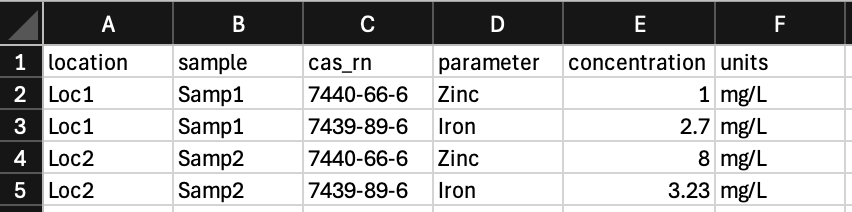
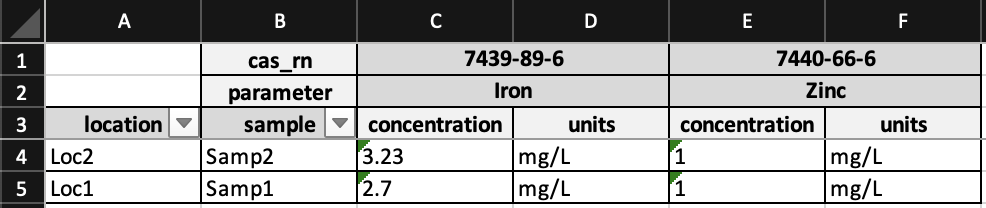
crosstab rearranges data from a normalized CSV format to a crosstabulated XLSX workbook, with styling. The pivot is computed in a single pass by DuckDB and the workbook is produced by XlsxWriter, so even very large inputs crosstab in seconds. Column names containing spaces, parentheses, embedded quotes, unicode, leading digits, or SQL reserved words pass through unmodified.
Go from this:
To this:
Installation
You can install crosstab via pip from PyPI:
There is also a Docker image available on the GitHub Container Registry:
Usage
The output workbook contains:
- Crosstab — the pivoted table. Row-header values are listed on the left; each distinct combination of column-header values fans out across the top, with one sub-column per requested value column.
- Source Data (optional) — a verbatim copy of the input CSV, written
when
keep_src=True.
Each of the examples below produces the same output.
Python
from pathlib import Path

from crosstab import Crosstab

Crosstab(
    incsv=Path("data.csv"),
    outxlsx=Path("crosstabbed_data.xlsx"),
    row_headers=("location", "sample"),
    col_headers=("cas_rn", "parameter"),
    value_cols=("concentration", "units"),
    keep_src=True,
).crosstab()
Command Line
-r, -c, and -v each accept one or more column names following the flag:
crosstab -s \
    -f data.csv \
    -o crosstabbed_data.xlsx \
    -r location sample \
    -c cas_rn parameter \
    -v concentration units
Run crosstab --help for the full option list.
Docker
docker run --rm -v $(pwd):/data ghcr.io/geocoug/crosstab:latest \
    -s -f /data/data.csv -o /data/crosstabbed_data.xlsx \
    -r location sample \
    -c cas_rn parameter \
    -v concentration units
Behavior
- Strings preserved. All CSV cells are read as strings via DuckDB's
read_csv(..., all_varchar=True), so values like01and2026-05-04are not coerced to numbers or dates. - Deterministic ordering. Row keys and column keys are sorted before being written, so re-running the same input produces a byte-identical output.
- Strict duplicate detection. If any
(row_key, col_key)combination appears more than once in the input, the run fails with a clearValueErrorrather than silently dropping data. Pre-aggregate the CSV with DuckDB, pandas, polars, etc. before crosstabbing if your source data has duplicates that should be combined.
Filling empty cells
By default, cells with no matching (row_key, col_key) row are left
blank. Pass fill="—" (or any string) to substitute a placeholder:
Persisting the database
Pass keep_duckdb=True (or --keep-duckdb / -k) to save the staged
input as a DuckDB database at <input>.duckdb so it can be queried again
later — handy when you want to follow up the pivot with ad-hoc SQL
without re-reading the CSV.